頂点列で表すPolygon図形を構成するエッジのうち、任意の長さ以上のエッジに対して分割し頂点を増やす処理。
Process of dividing vertices of arbitrary length and increasing vertex among edges constituting Polygon figure represented by vertex sequence.
(results sample picture)
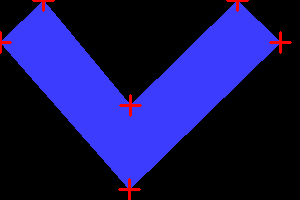
@red points : Polygon points
@blue pattern : Filled polygon
before
after
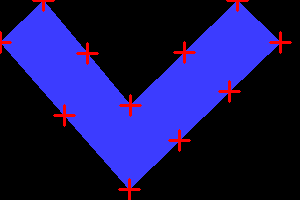
(results split edge)
original_points
[[237.894 0. ]
[130.554 105.408]
[ 43.748 0.626]
[ 0. 42.589]
[129.559 189. ]
[280. 42.589]
[237.894 0. ]]
after split points
[[237.894 0. ]
[184.224 52.704 ]
[130.554 105.408 ]
[ 87.151 53.017 ]
[ 43.748 0.626 ]
[ 0. 42.589 ]
[ 64.7795 115.7945 ]
[129.559 189. ]
[179.706 140.19633333]
[229.853 91.39266667]
[280. 42.589 ]
[237.894 0. ]]
sample code
|
1 2 3 4 5 6 7 8 9 10 11 12 13 14 15 16 17 18 19 20 21 22 23 24 25 26 27 28 29 30 31 32 33 34 35 36 37 38 39 40 41 42 43 44 45 46 47 48 49 50 51 52 53 54 55 56 57 58 59 60 61 62 63 64 65 66 67 68 69 70 71 72 73 74 75 76 77 78 79 80 81 82 83 84 85 86 87 88 89 90 91 92 93 94 95 96 97 98 99 100 101 102 103 104 105 106 107 108 109 110 111 112 113 114 115 116 117 118 119 120 121 122 123 124 125 126 127 |
import cv2 import sys import math import numpy as np def calc_vabs(v): x1 = v[0] y1 = v[1] x2 = v[2] y2 = v[3] xx = x2 - x1 yy = y2 - y1 xxyy = xx*xx + yy*yy dist = math.sqrt(xxyy) return dist def split_vect(v,slen): tp = np.empty((0,2), float) dist = calc_vabs(v) if dist < slen: x1 = v[0] y1 = v[1] tp = np.append(tp, np.array([[x1,y1]]), axis=0) else: snum = int(math.ceil(dist/slen)) x1 = v[0] y1 = v[1] x2 = v[2] y2 = v[3] xx = x2 - x1 yy = y2 - y1 dx = xx/snum dy = yy/snum for i in range(snum): xx = x1 + dx * i yy = y1 + dy * i tp = np.append(tp, np.array([[xx,yy]]), axis=0) return tp def split_longedge(oarr, slen): """ if 2points distance is long than slen, make new point between 2points. return new point list. """ # ----------------------------------- # convert point list to vector list # ----------------------------------- varr = np.empty((0,4), float) for i in range(len(lines)): lines[i].strip() jj = lines[i].split() xx1 = float(jj[0]) yy1 = float(jj[1]) if i != len(lines) -1: lines[i+1].strip() jj = lines[i+1].split() xx2 = float(jj[0]) yy2 = float(jj[1]) else: break varr = np.append(varr, np.array([[xx1,yy1,xx2,yy2]]), axis=0) i = i + 1 # ----------------------------------- # split long vector, and convert vector list to point list # ----------------------------------- arr = np.empty((0,2),float) for p in varr: tp = split_vect(p,slen) arr = np.append(arr, tp, axis=0) arr0 = np.array([[arr[0][0], arr[0][1]]]) arr = np.append(arr, arr0, axis=0) return arr def output2picture(arr, pic_name): w = 200 h = 300 img = np.zeros((w, h, 3), np.uint8) arr0 = np.empty((0,2), int) for p in arr: xx = int(p[0]) yy = int(p[1]) arr0 = np.append(arr0, np.array([[xx,yy]]), axis=0) cv2.fillPoly(img, [arr0], (255, 60, 60)) for p in arr: nnn = np.array([int(p[0]), int(p[1])]) cv2.drawMarker(img, tuple(nnn), (0, 0, 255), thickness=2) cv2.imwrite(pic_name, img) if __name__ == '__main__': in_data = open("./polygon_points.txt") lines = in_data.readlines() oarr = np.empty((0,2), float) for i in range(len(lines)): lines[i].strip() jj = lines[i].split() xx = float(jj[0]) yy = float(jj[1]) oarr = np.append(oarr, np.array([[xx,yy]]), axis=0) i = i + 1 arr = np.empty((0,2),float) #------------------------------------------------- # split function.second argument is split length. arr = split_longedge(oarr,100) #------------------------------------------------- print("\noriginal_points\n",oarr) print("\nafter split points\n",arr) output2picture(oarr,"01_original_points.png") output2picture(arr ,"02_split_points.png") |
■polygon_points.txt
237.894 0.000
130.554 105.408
43.748 0.626
0.000 42.589
129.559 189.000
280.000 42.589
237.894 0.000